
From Sub Zero Start Up to Summer Heat, How Industrial Displays Keep Working
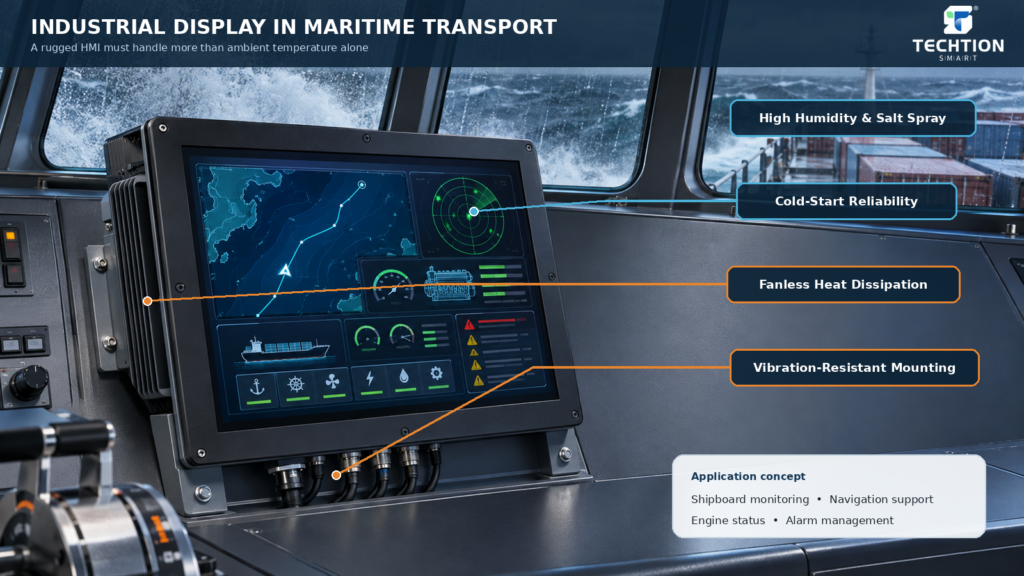
A cargo-vessel bridge display, an outdoor information terminal, a substation HMI and a cold-chain production board may look unrelated. Yet all can face temperature conditions far beyond those of ordinary office electronics.
A screen that performs normally indoors may respond slowly, lose contrast or fail to start when exposed to cold, heat, direct sunlight or a sealed enclosure. Industrial displays remain reliable not because of one “temperature-resistant” material, but because the LCD, optical materials, electronics, heating and cooling design are engineered as one system.
Why Temperature Changes the Image
Low temperature slows the liquid crystal
An LCD forms an image by changing the orientation of liquid-crystal molecules. At low temperature, the liquid crystal becomes more viscous and the molecules move more slowly. Pixels therefore take longer to switch, producing sluggish response, motion ghosting or delayed page changes. If the image returns to normal after warming up, the screen is usually not damaged; the behavior is generally a temporary temperature effect.
High temperature affects image quality and lifetime
As temperature approaches the liquid crystal’s clearing point, molecular order begins to break down. Contrast may fall and the image may look pale or soft. Heat also accelerates degradation of the LED backlight, polarizers, adhesives and electronic components. This is why the same display may last for years in a controlled room but age faster in a sun-heated or poorly ventilated enclosure.
A Wide Temperature LCD Is Only the Starting Point
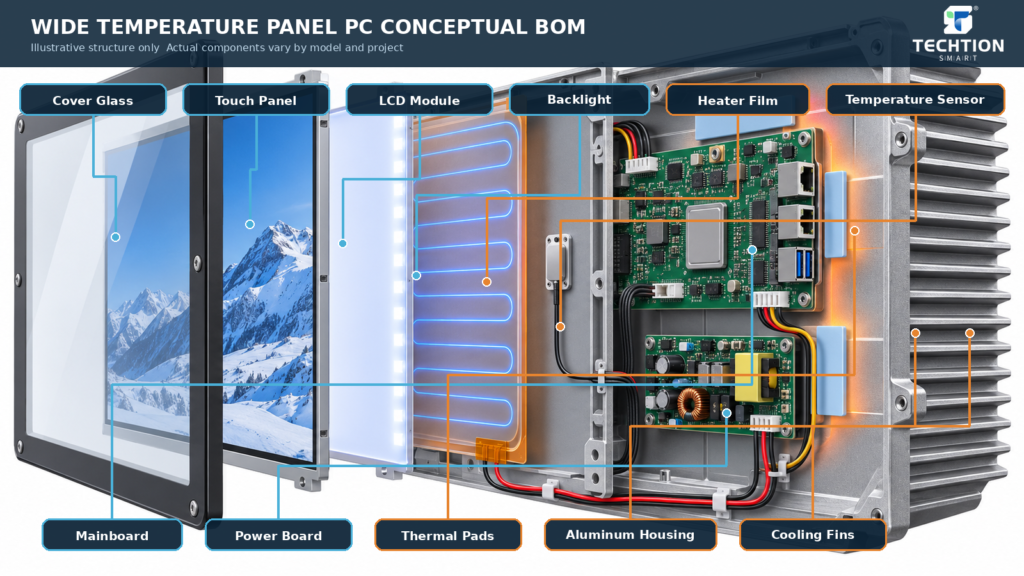
Industrial wide-temperature panels use liquid-crystal mixtures designed with a lower crystallization temperature and a higher clearing temperature. However, the polarizer, optical adhesive, frame seal, LED backlight, driver IC and interconnect materials must also support the same environment. One weak material can limit the entire display module.
A wide-temperature screen is not automatically a wide-temperature product
A panel PC also contains a mainboard, power supply, memory, storage, touch panel, connectors and sealing materials. If the LCD supports a wider range but the power board or processor does not, the complete unit cannot be rated to the LCD specification. The final operating range must be based on the weakest component and verified at system level.
Low-temperature projects may require preheating
For equipment that must start at –25°C or below, a wide-temperature LCD alone may not deliver the required response speed immediately. A heater film, temperature sensor and control circuit can warm the display first, then enable the backlight or normal operation after a safe threshold is reached.
Marine use requires additional evaluation
For a cargo vessel or shipboard control project, temperature is only one requirement. Humidity, salt fog, vibration, EMC, enclosure corrosion protection and any applicable marine certification must be reviewed separately. A wide operating-temperature range by itself does not qualify a product for marine installation.
Check Three Different Temperatures
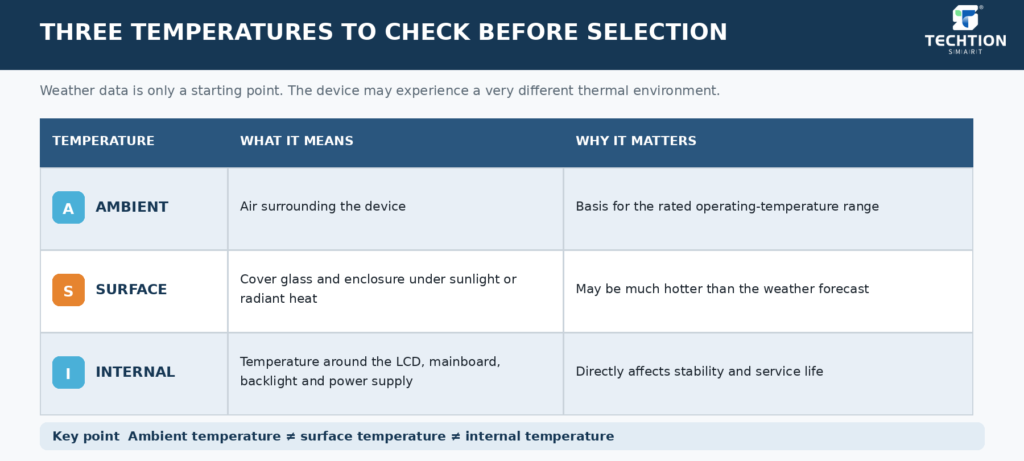
The weather forecast is useful, but it does not describe the complete thermal environment around a display. Direct sunlight, internal electronics and a sealed enclosure can make the surface and internal temperatures very different from the surrounding air.
How to Select the Required Operating Range
- Installation location: Indoor, semi-outdoor, fully outdoor, inside a vehicle, on a vessel or inside a sealed cabinet.
- Real temperature extremes: Check the highest and lowest temperature at the installation point, not only the annual average.
- Additional heat sources: Sunlight, backlight, processor, power supply, engine and nearby equipment all increase temperature.
- Start-up condition: Confirm whether the unit must start directly at the minimum temperature or may preheat first.
- Design margin: Avoid continuous operation at the absolute temperature limit; retain margin for variation and aging.
For example, a production line maintained between 5°C and 40°C is normally well covered by a –20°C to 70°C industrial configuration. An outdoor transport terminal that must start at –25°C may need wider-temperature components and preheating. A sealed cabinet can require additional thermal analysis even when the surrounding workshop is only 40°C, because the internal temperature may be much higher.
High Temperature Cabinets Need System Level Cooling
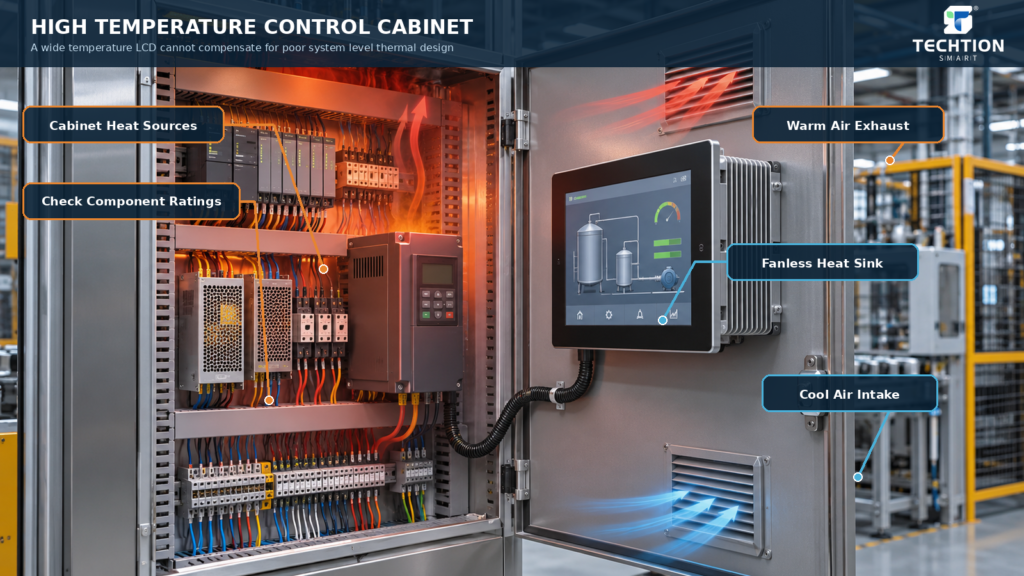
A wide-temperature LCD cannot compensate for poor heat dissipation. Control cabinets may contain PLCs, variable-frequency drives and power supplies that raise the internal temperature well above the surrounding air. The enclosure material, thermal pads, heat sinks, airflow and component ratings must all be checked.
Two Common Questions
Is low-temperature ghosting a screen failure ?
Usually not. If response and image quality recover after the unit warms up, the effect is normally caused by increased liquid-crystal viscosity. For continuous low-temperature operation, use a suitable wide-temperature panel or add controlled preheating.
Is a wide-temperature LCD enough for a hot cabinet ?
No. Check the enclosure’s heat-transfer path, internal ventilation, thermal pads or heat sinks, and the temperature ratings of the mainboard, driver board and power supply. The system may fail at a component other than the LCD.
Do Not Confuse Operating and Storage Temperature
Operating Temperature is the range in which the powered product is designed to start and continue operating. Storage Temperature is the range the unpowered product can withstand. A unit that can be stored at –30°C is not necessarily able to start at –30°C.
How Techtion Smart Applies These Principles
Techtion Smart supplies industrial monitors, panel PCs and transportation terminals for different environments. Examples include the TS-190PCWY die-cast aluminum panel PC for automation and equipment HMI, the TS-156MCNJ aluminum-frame and galvanized-steel monitor for embedded installations, and the TS-173MRBX stainless-steel product for washdown and corrosion-sensitive industrial applications. Actual operating ranges are confirmed by configuration.
Some standard industrial panel PC configurations may support –20°C to 70°C, while –30°C to 85°C solutions can be evaluated for demanding projects. Final ratings depend on the LCD, touch panel, mainboard, power supply, enclosure and validation. Marine, outdoor and corrosive installations also require project-specific checks. Choose the complete system that matches the real environment—not simply the widest number on the datasheet.
 Previous Article

 Microsoft Teams
 WhatsApp
 Email
 Inquiry
 WeChat

 TOP